
18. April. 2013 | von Christopher Rudolf
The TOP HAIR 2013 in Düsseldorf, preparations for the Beauty Forum in Leipzig and many interesting conversations with other platforms were significant topics in March. But many new useful functions could also be implemented to make working with the zeitfest calendar even easier and faster and to optimize online booking.
Customer names can now be selected and deselected using the keyboard. If a customer is new, there is a "New Customer" button that suppresses further suggestions. The following video shows you how to best handle the new function.
In the "Prices & Services" section you can now see at a glance in what order your products are scheduled when your customers book themselves. The order can be easily moved with the mouse.
Configure how far in advance bookings are allowed. In the global settings you can find the new option under "Online Booking" and "Settings". You can also restrict the offered appointments: To optimally utilize your agenda, you can configure the display of available appointments flush. This way fewer available appointments are displayed to customers, but they are always flush and there are fewer unusable gaps in your calendar.
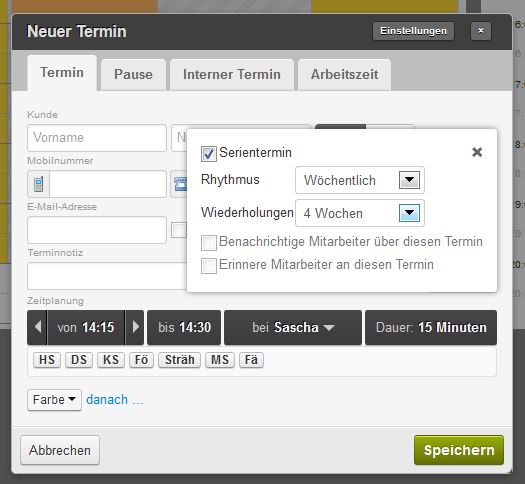
Series appointment and notifications
Series appointments can now be configured directly when creating an appointment. Simply press "Advanced" and configure the series appointment there: Frequency & Duration, save and done. The follow-up appointments for this appointment can then be conveniently viewed in the detail view.
Furthermore, existing appointments can be copied, for example to schedule a follow-up appointment: Simply go to the detail view and select "Copy appointment" in the options at the top right. A calendar then opens to select the target date. After selecting the day, the calendar view jumps to the new day containing the copied day. Done!
You can now activate the SMS TAN procedure for your customers independently. This means that registration requires not only a valid email address but also a valid mobile number.
Try it out and benefit from reliable customer registrations.
Configure your services so that they can be inserted into possible idle times. For example, if you dye eyebrows while hair color is processing, you can define this as a processing time product. During booking, this service is then automatically placed in the processing time and thus the total appointment duration is optimally calculated from the start. You can select the option under "Settings" of a product. Please note that this option only exists for hair and beauty salons. At the end of the video above, we go into this option.
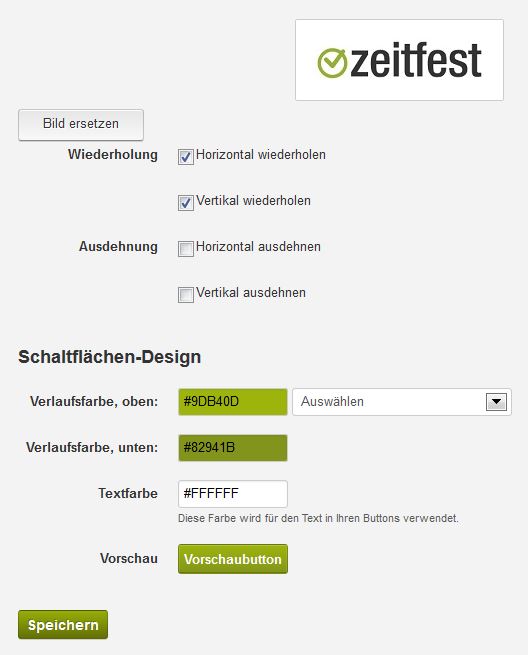
New options
Choose the appropriate colors for the buttons on your booking interface. In the global settings under Online Booking and Appearance, you can easily select the color.
This includes the property of whether a possible background image is stretched or repeated, as well as the adjustment of colors on the buttons of your booking platform.
You can independently select colors or choose from one of the pre-made color variants.
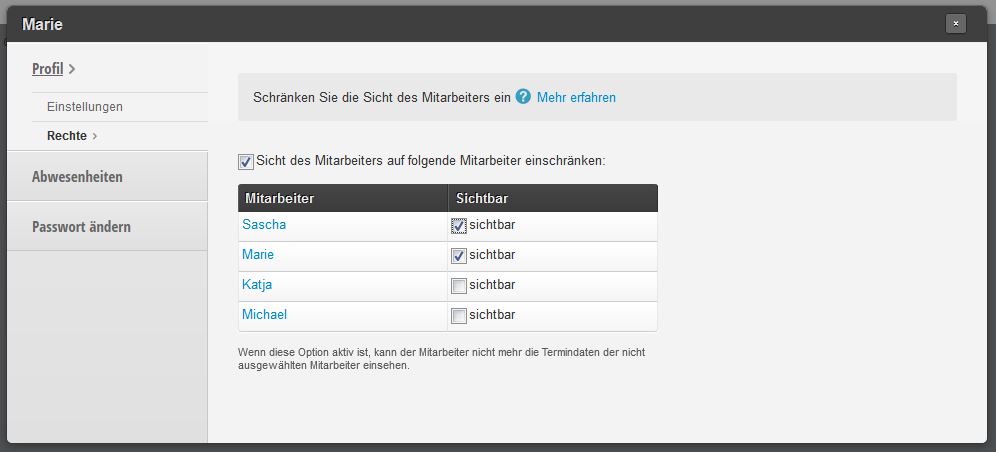 The employee profile has been restructured: Now simply and clearly view settings, absences and rights: Configure exactly which parts of the calendar are visible for which employee login. This allows you to ensure, for example, that your employee under the personal login can only view their own schedule and thus cannot accidentally change other data from home.
We've turned on the turbo and made some optimizations so your calendar loads in under 0.3 seconds even with a full schedule. Performing actions in the calendar is now also more reliable and faster.
Get in touch with us if you have any questions or would like to take a closer look at Belbo.

Melden Sie sich bei uns, wenn Sie nähere Informationen wünschen!